iPad Protection Plan + Loan Agreement Guide
Follow these steps to complete the mandatory iPad Loan Agreement and choose your protection plan for the school year. Use the Translate button at the top to change page language.
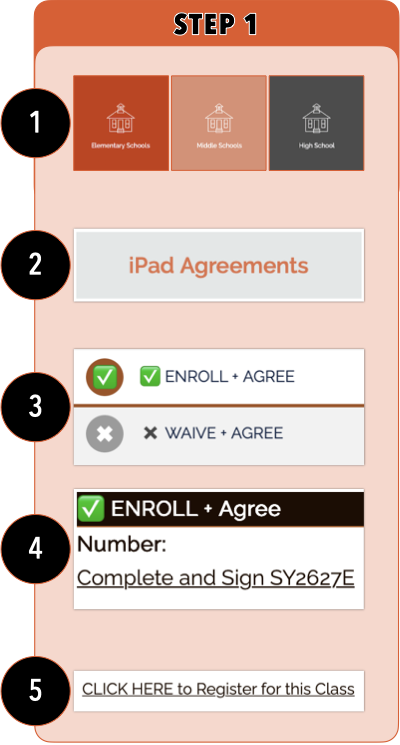
Step 1: Find Your School & Plan
- Select Level: Choose Elementary, Middle, or High School from the main menu.
- Select School: Click the iPad Agreements button for your child's specific school.
- Choose a Protection Plan: Select one of the two options:
- ENROLL PLAN: $40/student ($0 for families approved for Educational Benefits)
- WAIVE PLAN: No fee. You agree to terms but decline protection.
- Complete and Sign: Select to advance.
- Register: Select the "CLICK HERE to Register for this Class" link.
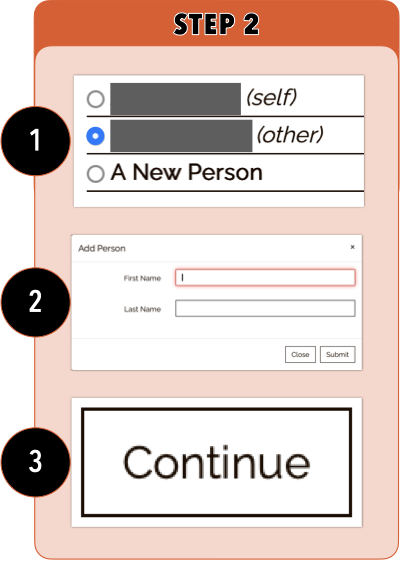
Step 2: Assign the Student
- Who are you registering? Select your student’s name (labeled "other").
- Important: Do not select yourself ("self").
- New Students: If your child isn't listed, click "A New Person" and enter their info using proper capitalization.
- Confirm: Ensure the blue dot is next to the student's name and click Continue.
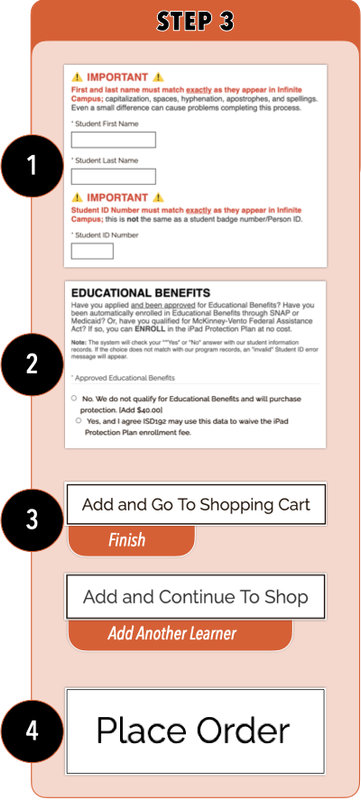
Step 3: Required Questions & Checkout
- Enter Details: Complete all required questions.
- Troubleshooting: Ensure Student ID and Name match Infinite Campus exactly.
- Add to Cart:
- Select Add and Continue to Shop for another child.
- Select Add and Go to Cart if finished.
- Checkout: Review your order.
- Place Order: Select Place Order and you will get an email that confirms completion.
Quick Tips
- Avoid the "Back" Button: Use on-screen navigation within the Web Store.
- Browser Errors: Clear your cache if the page freezes.
- Need Help? View our Troubleshooting Guide.